The Best Digital Planners (2026 Buyer’s Guide)
Compare the top digital planners for iPad, GoodNotes, families, students, and professionals. From interactive touchscreens to hybrid PDF systems—find your perfect planning solution.
Searching for the best digital planners can feel overwhelming in a market flooded with options. As we move into 2026, digital planning has evolved far beyond simple PDF templates—today’s best solutions include interactive touchscreen displays, cloud-synced family command centers, and hybrid systems that bridge the gap between handwriting and digital organization.
Whether you need the best digital planner for iPad to use with GoodNotes, a 32-inch smart hub for your kitchen wall, or a portable hybrid system for students, this comprehensive guide will help you choose the right tool for a stress-free, organized life.
🎁 Free Bonus: Get started today with our Free 2026 Daily Productivity Planner (PDF) to test digital planning before investing in premium systems!
Quick Comparison: Top Digital Planners 2026
| Planner Name | Best For | Type | Syncing | Rating | Price | Check Price |
|---|---|---|---|---|---|---|
| Dragon Touch 15.6″ | Families | Interactive Display | Apple/Google | ⭐ 4.3/5 | $159.98 | View Deal |
| Rocketbook Flex | GoodNotes Users | Hybrid PDF | GoodNotes/Cloud | ⭐ 4.4/5 | $34.99 | View Deal |
| Fiteye 32″ | Households | Wall-Mounted Display | iPad Sync | ⭐ 5.0/5 | $499.99 | View Deal |
| Cozyla Mate 2 | ADHD/Visual Learners | Smart Dashboard | All Apps | ⭐ 4.7/5 | $449.99 | View Deal |
| Viewzio 32″ | Professionals | Android Display | Apple/Google | ⭐ 4.8/5 | $479.99 | View Deal |
Best Digital Planners for iPad Users
If you’re invested in the Apple ecosystem and want seamless integration with your iPad, Apple Pencil, and apps like GoodNotes or Apple Calendar, these digital planners offer the best compatibility and user experience.
Dragon Touch 15.6 inch Digital Calendar Chore Chart – Best for Families
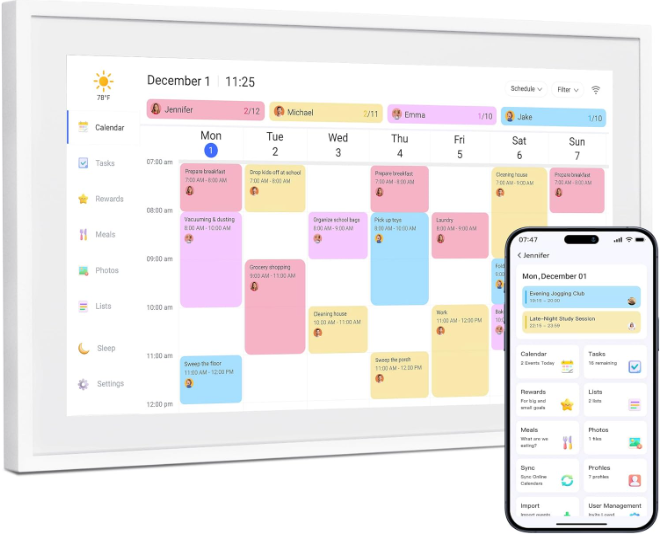
The Dragon Touch 15.6 inch Digital Calendar is a powerhouse for families seeking the best digital planner for iPad integration. This interactive touchscreen syncs directly with Apple Calendar, ensuring your iPad updates reflect instantly on the wall-mounted display. At $159.98, it delivers exceptional value for busy households managing multiple schedules.
- Full iOS/iPadOS Integration: Two-way sync with Apple Calendar
- Built-in Chore Charts: Visual task management for kids and adults
- Grocery List Templates: Pre-formatted shopping lists
- 15.6″ Touchscreen: Large enough for easy family viewing
- Digital Picture Frame Mode: Display photos when not planning
Best For: Families with multiple Apple devices who want a centralized command center that syncs across all household members’ calendars.
Buy Dragon Touch on Amazon →Fiteye 32″ Digital Calendar – Best for Household Command Centers
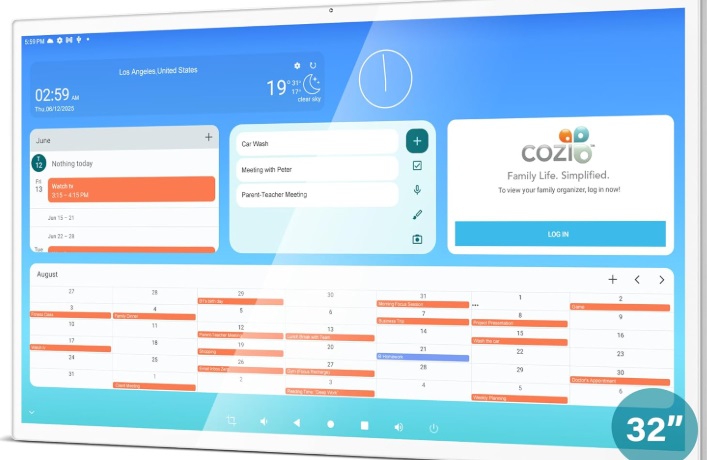
For maximum visibility and premium smart home integration, the Fiteye 32″ Digital Calendar offers a massive display perfect for stress-free home management. Google-certified and iPad-compatible, this wall-mounted planner serves as a shared command center that syncs seamlessly with your productivity ecosystem.
- 32-Inch Full Touchscreen: Restaurant menu-sized display
- iPad Sync Compatible: Works with Apple Calendar and Google Calendar
- To-Do List Integration: Task management visible to entire household
- Google Certification: Verified compatibility with Google services
- Smart Home Ready: Integrates with home automation systems
Best For: Tech-savvy households wanting a premium, large-format digital planner that serves as the central hub for all family scheduling and task management.
Buy Fiteye 32″ on Amazon →Best Digital Planner PDFs for GoodNotes
For those who prefer the tactile experience of handwriting but want the benefits of digital organization, hybrid planners that integrate with GoodNotes offer the perfect middle ground.
Rocketbook Flex Reusable Planner – Best Hybrid Handwriting Experience
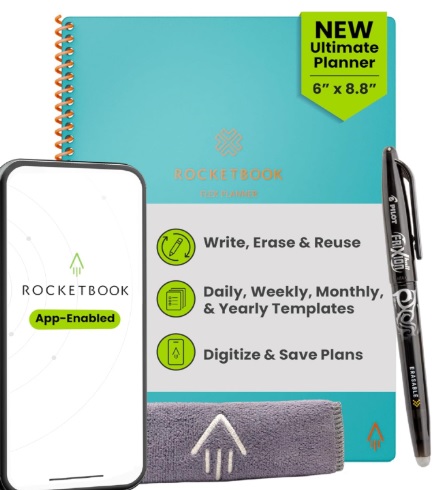
The Rocketbook Flex is the ultimate best digital planner PDF hybrid for those who miss the feel of pen on paper. This innovative reusable daily planner allows you to write by hand with any pen from the Pilot FriXion line, then scan your pages directly into GoodNotes, OneNote, or cloud storage using the Rocketbook app.
- Infinite Reusability: Wipe clean with a damp cloth and reuse indefinitely
- GoodNotes Integration: Scan pages directly into your iPad planning app
- Multiple Templates: Daily, weekly, monthly, and annual calendar layouts
- Executive 6×8.8″ Size: Portable yet spacious for detailed planning
- Cloud Sync: Automatically upload to Google Drive, Dropbox, or iCloud
- Eco-Friendly: Eliminates paper waste from traditional planners
Best For: Students, professionals, and GoodNotes users who want the cognitive benefits of handwriting combined with digital organization and searchability.
💡 Pro Tip: The Rocketbook Flex is ideal for students who need to organize handwritten notes digitally. Write your study schedule, scan it to GoodNotes, and access it from any device while keeping the original in your backpack.
Best Interactive Digital Planners for ADHD & Custom Dashboards
Visual learners, individuals with ADHD, and those who need highly customizable planning systems benefit most from interactive displays with color-coded dashboards and reward-based task management.
Cozyla Mate Calendar+ 2 – Best for Visual Organization
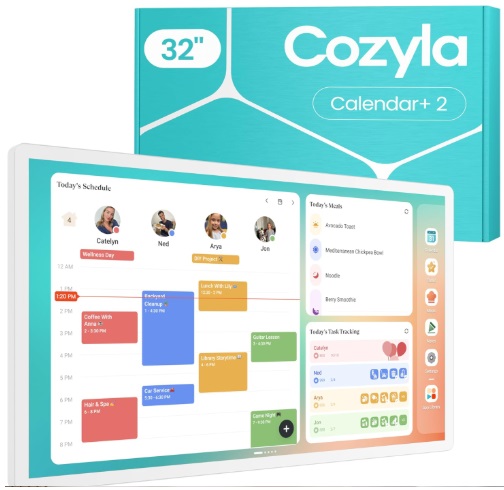
The Cozyla Mate Calendar+ 2 is arguably the best digital planner for ADHD due to its highly visual, customizable dashboards. This 32-inch smart display supports reward-based chore systems, color-coded task categories, and meal planning—all controlled remotely through an iPad app.
- Customizable Color Dashboards: Create visual categories that reduce cognitive overwhelm
- Reward-Based Chore System: Motivate family members with built-in incentive tracking
- Meal Planning Integration: Weekly meal prep visible at a glance
- Remote iPad Control: Update schedules from anywhere in the house
- Universal App Support: Syncs with Apple Calendar, Google Calendar, and more
- High-Visibility Display: 32-inch screen perfect for quick visual checks
Best For: Families with neurodivergent members, busy parents managing multiple children’s schedules, and anyone who benefits from visual task management systems.
Buy Cozyla Mate on Amazon →Viewzio 32″ Digital Planner – Best for Android Flexibility
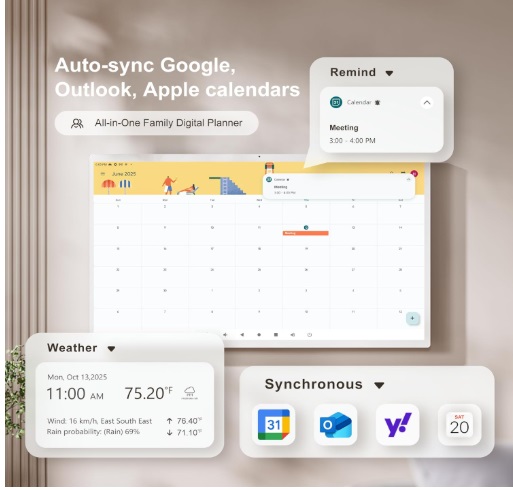
The Viewzio 32 Inch Digital Planner provides Android-based flexibility for users who want a fully customizable smart home planning experience. Rated 4.8/5 by users, this wall-mounted unit is built for professionals and families who demand a tailored productivity and goal setting dashboard with dual Apple and Google Calendar sync.
- Android Operating System: Install custom productivity apps and widgets
- Dual Sync Capability: Works with both Apple and Google calendars simultaneously
- Touchscreen Chore Charts: Interactive task assignment for families
- Custom Widget Support: Add weather, news, or fitness tracking
- Professional Design: Sleek interface suitable for home offices
Best For: Tech enthusiasts, professionals with hybrid work schedules, and families who want maximum customization in their digital planning ecosystem.
Buy Viewzio 32″ on Amazon →Digital vs. Paper Planners: Which Should You Choose?
The debate between digital and paper planners isn’t about which is objectively better—it’s about which aligns with your lifestyle, cognitive preferences, and organizational needs.
When Digital Planners Excel
- Collaboration: Multiple family members can access and update the same calendar in real-time
- Automatic Syncing: Changes made on your phone instantly appear on wall displays and tablets
- Eco-Friendliness: Eliminates paper waste and the need to purchase new planners annually
- Search Functionality: Find old appointments or notes instantly with keyword search
- Infinite Space: Never run out of pages or worry about messy handwriting
- Remote Updates: Add events from anywhere, even when away from home
When Paper Planners Still Win
- Memory Retention: Research shows handwriting improves information retention by up to 34%
- Tactile Satisfaction: The physical act of writing provides emotional comfort and mindfulness
- No Screen Fatigue: Reduces digital overwhelm and eye strain
- Creative Freedom: Draw, doodle, and personalize without software limitations
- No Power Required: Works anywhere, anytime, without batteries or WiFi
The Hybrid Solution: Many users find success combining both systems. Use a paper planner like our modern American women’s planners for daily mindfulness and goal-setting, while maintaining a digital calendar for appointments and family coordination. Or choose the Rocketbook Flex to get the best of both worlds.
For those who prefer the guided structure of paper but need digital collaboration features, explore our collection of weekly guided planners for busy women or our guided home planners for budget and bills.
How to Choose the Right Digital Planner
Selecting the best digital planner depends on your primary use case, technical ecosystem, and planning style. Here’s how to decide:
👨👩👧👦 For Families
Recommended: Dragon Touch 15.6″ or Cozyla Mate Calendar+ 2
Why: Built-in chore charts, multi-user sync, and large displays visible from across the room make family coordination effortless.
🎓 For Students
Recommended: Rocketbook Flex
Why: Combines handwriting for better retention with digital organization for easy access across devices. Perfect for lecture notes and assignment tracking.
💼 For Professionals
Recommended: Viewzio 32″ or Fiteye 32″
Why: Large format displays keep project timelines, meetings, and deadlines visible. Professional aesthetics suitable for home offices.
🧠 For ADHD/Visual Learners
Recommended: Cozyla Mate Calendar+ 2
Why: Color-coded dashboards, reward systems, and high-visibility design reduce executive function load and improve task completion.
📱 For iPad/GoodNotes Users
Recommended: Rocketbook Flex (hybrid) or Dragon Touch 15.6″ (display)
Why: Seamless integration with Apple ecosystem and GoodNotes app functionality.
🏠 For Smart Homes
Recommended: Fiteye 32″ or Viewzio 32″
Why: Google certification and smart home integration allow centralized control of household systems and schedules.
Key Features to Consider
- Display Size: 15″ for personal/small families, 32″ for large households or shared spaces
- Sync Compatibility: Ensure it works with your existing calendar system (Apple, Google, or both)
- Handwriting vs. Typing: Choose hybrid systems if you value pen-to-paper experience
- Customization Level: Android-based systems offer more flexibility; closed systems are more user-friendly
- Price Point: $30-50 for hybrid notebooks, $150-200 for small displays, $400-500 for premium large-format systems
Frequently Asked Questions About Digital Planners
What is the best digital planner for iPad?
The Dragon Touch 15.6 inch and Fiteye 32 inch are the best digital planners for iPad users, offering seamless two-way syncing with Apple Calendar and compatibility with iPad productivity apps. For a hybrid handwriting experience that integrates with GoodNotes, the Rocketbook Flex is the top choice.
Are digital planners better than paper planners?
Digital planners excel in collaboration, automatic syncing, eco-friendliness, and infinite storage, making them ideal for families and professionals managing multiple schedules. However, paper planners are often preferred for memory retention, tactile satisfaction, and creative freedom. The best solution depends on your cognitive preferences and lifestyle needs. Many users successfully combine both systems using hybrid planners like the Rocketbook Flex.
What is the best digital planner for families?
The Dragon Touch 15.6 inch ($159.98) and Cozyla Mate Calendar+ 2 ($449.99) are the top choices for families. Both offer integrated chore charts, multi-user calendar syncing, grocery list templates, and large displays that serve as centralized command centers for household coordination.
What is the best digital planner for ADHD?
The Cozyla Mate Calendar+ 2 and Fiteye 32 inch are ideal for ADHD management. Their color-coded dashboards, high-visibility displays (32 inches), and customizable visual systems reduce cognitive overwhelm and provide clear structure. The reward-based chore features in Cozyla Mate are particularly effective for maintaining motivation.
What is the best digital planner for GoodNotes?
The Rocketbook Flex Reusable Planner is the best option for GoodNotes users. It allows you to write by hand with pen and paper, then scan your pages directly into the GoodNotes app on your iPad using the Rocketbook mobile app. This hybrid approach combines the cognitive benefits of handwriting with digital organization and searchability.
What is the best digital planner for students?
Students benefit most from the Rocketbook Flex due to its portability (6×8.8 inches), infinite reusability (wipe clean and reuse), GoodNotes integration for digital note organization, and affordable price point ($34.99). It’s perfect for lecture notes, assignment tracking, and study schedules that need to be accessible across multiple devices.
Do digital planners work with Android phones?
Yes! The Viewzio 32 inch runs on Android OS and offers native integration with Google Calendar and Android phones. The Dragon Touch, Fiteye, and Cozyla Mate all support Google Calendar sync, making them compatible with both iOS and Android devices. The Rocketbook Flex app is also available for Android.
Can I use digital planners without WiFi?
Wall-mounted digital calendar displays require WiFi for initial setup and syncing, but most can display your schedule offline once loaded. The Rocketbook Flex works entirely offline for writing; you only need WiFi when scanning pages to cloud storage. For a completely offline solution, consider our paper planner collection.
How much do the best digital planners cost?
Digital planner prices range from $34.99 (Rocketbook Flex) for hybrid notebooks, $159.98 (Dragon Touch 15.6″) for entry-level displays, to $449-499 (Cozyla Mate, Fiteye, Viewzio 32″) for premium large-format systems. The investment depends on your feature needs and household size.
Start Planning Your Productive 2026 Today
The best digital planners are the ones that actually get used. Whether you choose a family-centric wall display like the Dragon Touch, a student-friendly hybrid like the Rocketbook Flex, or a premium smart home system like the Fiteye 32″, your journey to better organization starts with a single decision.
Still not sure which option is right for you? Explore our complete collection of planners or discover stress-reduction techniques with our free guided meditation for sleep.
Discover more organizational solutions at GuidedPlanners.com