If you’re searching for the best digital planner for iPad for 2026, you’ve probably already wasted an afternoon going down a rabbit hole of pretty templates that looked amazing in the preview and felt awkward the moment you actually tried to use them.
I’ve been there.
I’m a planner designer with five years of experience creating and reviewing digital planners, journals, and planning systems for women, men, nurses, educators, professionals, and students.
I’ve built them from scratch.
I’ve tested them in real life.
And I’ve watched people either fall in love with digital planning or quietly go back to a paper notebook by week three.
This guide cuts through the noise.
No fluff. No recycled listless. Just what actually works in 2026.
- Why Finding the Right Digital Planner for iPad Feels So Hard
- What's Actually Changed in Digital Planner Trends 2026
- The Best Digital Planner for iPad for 2026: My Top Picks
- Best Digital Planner App: Where to Actually Write in It
- Best Digital Planner for iPad for Students in 2026
- The Planning Piece Most Digital Planners Skip
- How to Pick the Best Planner for iPad Without Overthinking It
- Can You Use a Digital Planner on MacBook?
- What Makes Guided Planners Different From the Rest
- FAQs: Best Digital Planner for iPad for 2026
- The Bottom Line
Why Finding the Right Digital Planner for iPad Feels So Hard
Let me ask you something.
Have you ever downloaded a planner, imported it into GoodNotes, spent twenty minutes setting it up — and then never opened it again?
Most people have.
Here’s why it happens:
- The layout didn’t match how they actually think
- The planner had too many sections they’d never use
- Navigation was clunky and slow
- It felt like a chore instead of a tool
The best digital planner for iPad isn’t the one with the most tabs.
It’s the one that fits into your day so naturally you don’t even think about it.
That’s the standard I design to. That’s the standard I review to.
What’s Actually Changed in Digital Planner Trends 2026
The digital planner trends 2026 tell a clear story.
People are moving away from overdesigned planners with fifteen sections they never touch.
What’s working right now:
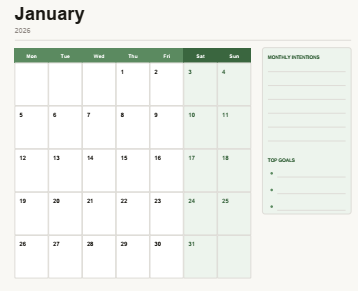
Clean weekly layouts. One view. The whole week. No hunting around.
Undated formats. You pick up where you left off. No guilt when life gets busy.
Integrated habit and goal tracking. Not separate apps. Right inside the planner.
Minimalist design with personality. Simple enough to feel calm. Styled enough to feel like yours.
Cross-device use. The best digital planner apps for MacBook 2026 are growing because people want their planner available on every screen they use.
The best digital agenda 2026 looks nothing like the overcrowded templates that were popular a few years ago.
The Best Digital Planner for iPad for 2026: My Top Picks
1. Guided Planners — The Overall Best Digital Planner for iPad
I’ll be upfront: I design these planners.
And I’m recommending them because they genuinely work — not because they’re mine.
The best digital planner by Guided Planners was built with one goal: create a planning system that people actually stick with.
Here’s what makes it stand out:
- Hyperlinked navigation that takes you exactly where you need to go
- Clean layouts designed for real daily use — not just screenshots
- Works perfectly as a best digital planner for GoodNotes experience
- Flexible enough for nurses, business owners, students, and creatives
- No complicated setup process
When I designed this, I pulled from five years of feedback — what frustrated people, what kept them coming back, what made planning feel like a habit instead of a project.
This is the result.
👉 Check out the best digital planner from Guided Planners here
2. Free Digital Planner for iPad 2026
Not ready to invest yet?
Start with the free digital planner for iPad 2026 from Guided Planners.
It’s one of the most downloaded free planning resources available right now.
It’s fully hyperlinked, imports into GoodNotes smoothly, and gives you a real taste of what a well-designed digital iPad planner should feel like.
Use it for a few weeks.
If it changes how your days feel, that tells you everything you need to know.
3. Free 2026 Digital Planner PDF Download
This one works as both an electronic planner tablet option and a desktop planning tool.
It’s clean, straightforward, and designed for someone who wants to get organized without spending hours on setup.
👉 Download the Free 2026 Digital Planner PDF here
Works great across GoodNotes, Notability, and even basic PDF viewers on MacBook.
Best Digital Planner App: Where to Actually Write in It
The planner file is only half of the equation.
The app you write in matters just as much.
Here’s how the main digital planner apps for iPad stack up in 2026:
GoodNotes 6 Still the best option for most people. Hyperlinks work perfectly. The writing experience with Apple Pencil is smooth. Organization feels intuitive. This is why “best digital planner for GoodNotes” gets searched so often — it’s genuinely the go-to combination.
Notability Works well if you mix audio recordings with your planning. Less ideal for complex planner templates with lots of tabs.
Apple Notes Free, simple, and fine for basic use. Not built for detailed planner templates.
Noteful Gaining popularity in 2026 for users who want a minimalist setup.
For the vast majority of people, GoodNotes is the answer.
Best Digital Planner for iPad for Students in 2026
Students have a specific problem.
Their life doesn’t split cleanly into “school” and “personal.”
It’s all mixed together — classes, part-time jobs, social plans, deadlines, sleep.
The best digital planners for students in 2026 are the ones that hold all of it without making you feel like you’re filling out paperwork.
What to look for:
- Weekly view that shows the full picture at a glance
- Space for both academic and personal tasks on the same page
- Simple enough to open during a five-minute break
- Works in GoodNotes so it lives in the same app as your lecture notes
The free 2026 digital planner PDF is a solid starting point for students who want something that works without spending money first.
The Planning Piece Most Digital Planners Skip
Here’s something I’ve noticed across five years of designing planners.
Most people plan their days.
Very few people plan their actual goals.
These are different things.
Scheduling tells you what you’re doing on Tuesday.
Goal planning tells you what Tuesday is for.
When you connect your daily planning to something bigger, everything shifts.
That’s why I created a separate resource just for this:
👉 Goal Planning Planner Template Free PDF
It works alongside any digital planner you’re using — including the Guided Planners system — and it changes how you show up to your day.
How to Pick the Best Planner for iPad Without Overthinking It
I hear from people who’ve spent weeks comparing options and still haven’t started.
Here’s a simple framework that cuts that down to about ten minutes:
Know your layout preference. Daily or weekly? If you need to see the full week at once, pick a weekly layout. If you plan hour by hour, go daily.
Pick GoodNotes first. If you don’t have a planning app yet, start with GoodNotes. It’s the most compatible option for the best iPad planners available right now.
Start free. Test a format before committing. The free options from Guided Planners are a real, fully functional way to do that.
Use it for two weeks before judging it. One week isn’t enough. You need to see how it handles a busy week and a slow one.
Upgrade when you know what you need. Once you know your planning style, investing in the right system makes a lot more sense — and feels a lot less like a guess.
Can You Use a Digital Planner on MacBook?
Yes — and this is growing fast.
GoodNotes now has a solid Mac app.
So your touchscreen agenda on iPad and your MacBook can stay fully synced through iCloud.
For people who write on iPad and type on MacBook, this combination is genuinely useful.
The best digital planner apps for MacBook 2026 are mainly GoodNotes and Notability — both of which have Mac versions that work with the same planner files you use on iPad.
If you want one planner that works across every device you own, look for a PDF format compatible with both.
What Makes Guided Planners Different From the Rest
I’ve reviewed a lot of planners over the past five years.
The ones that fail usually share the same problems:
- Beautiful design, no functional thought behind it
- Layouts that work for the designer but not the user
- No flexibility for different life situations
When I build a planner at Guided Planners, I start with real feedback.
What do nurses need that educators don’t? What do students need that business owners skip? What do women who are managing both a career and a household actually have time to fill in every day?
Every layout is a response to those questions.
That’s why the Guided Planners digital planner works for such a wide range of people.
It’s not built for one type of life. It’s built around how actual humans plan.
FAQs: Best Digital Planner for iPad for 2026
What is the best digital planner for iPad for 2026?
For most people, the Guided Planners digital planner is the strongest option right now. It’s well-designed, hyperlinked, and works across different lifestyles and professions.
Is GoodNotes the best app for digital planners?
For iPad users, yes. It handles hyperlinks well, feels great to write in with Apple Pencil, and stays organized. Most of the top planner templates are built specifically for GoodNotes.
What is the best free digital planner for 2026?
The free digital planner for iPad 2026 from Guided Planners is the one I recommend most. It’s fully functional, not just a sampler.
Are digital planners good for students?
Yes, when they’re designed for flexibility. The best ones hold both academic and personal planning in the same view without feeling like a school tool.
Can I use a digital planner on MacBook as well as iPad?
Yes. GoodNotes syncs across both via iCloud. You can write on your iPad and view or type on your MacBook in the same planner file.
How long does it take to get into a digital planning habit?
Give it two real weeks. One week isn’t enough to judge. Two weeks shows you how the system holds up when life gets full.
The Bottom Line
The best digital planner for iPad for 2026 is the one that fits how you actually live — not how you wish you lived when you bought it.
Start with something free.
Learn what your planning style really is.
Then invest in a system designed for it.
If you want a place to start right now, the free digital planner for iPad from Guided Planners is the most honest way to test whether digital planning is for you.
And when you’re ready to go all in, the best digital planner by Guided Planners is built to grow with you.
Your planner should work for you not the other way around.